
wmlink2step.co WalmartOne 2-Step Verification Guide
WMlink/2Step Verification — 3 Setup Methods, New Phone Trap Fix & OneWalmart Login Guide (2026)
WMlink/2Step Verification
WMlink/2-Step Verification (2SV) is a secure authentication system used by Walmart associates to connect their employee accounts with personal devices and safely access OneWalmart, schedules, payroll, paystubs, and benefits from outside the store network. It requires a username and password along with a second verification method such as a code sent to your phone or generated by an authentication app to ensure secure and verified login access.
wmlink2step.co is an independent guide website that helps Walmart associates understand how to access and use the WMlink/2-Step Verification (2SV) system. It provides simple instructions for setting up authentication, downloading the Symantec VIP Access app, logging in securely, fixing verification issues, updating phone numbers, and managing secure access to employee tools like schedules, payroll, and account settings.
Hashtags:
#WMlink #WMlink2Step #Walmart2StepVerification #Walmart2SV #TwoStepVerification #2StepVerification #SecureLogin #AccountSecurity#VIPAccess #SymantecVIP #VerificationCode #OTPCode #LoginHelp #AuthenticationApp #SecureAccess#FixWMlink #LoginIssues #2SVFix #AccountRecovery #VerificationError #TechSupport #Reset2Step#EmployeePortal #WorkFromHomeLogin #SecureAuthentication #OnlineAccess #DigitalSecurity #HRTools#Zylen Archer
What is Walmart 2-Step Verification?
2-Step Verification is an extra layer of security. Even if someone knows your Walmart user ID and password, they cannot log into your account without a second "key" usually a code sent to your phone or generated by an app.
You need this to access:
- One.Walmart.com (from home)
- Me@Walmart app (on a personal phone)
- My Walmart Schedule
- Paystub Portal
🛠 How It Works
Step 1 – Something you know:
Walmart username & password
Security questions or PIN
Step 2 – Something you have:
Text message with a code
Voice call with a code
Symantec VIP Access app (generates rotating codes)
Physical security key/token
Even if someone steals your password, they cannot log in without the second factor.
Crucial Requirement: You MUST be at work to set it up
For security reasons, you cannot enroll in 2-Step Verification from your home computer or personal phone for the first time.
You must be on the Walmart network (using a handheld/TC70 device or a workstation computer in the store/facility).
You must be "on the clock" (logged in and working).
How to Set It Up (Step-by-Step)
While at work, follow these steps:
1. Log in: Open the Wire/One.Walmart on a work computer.
2. Search: In the search bar, type "2-Step Verification" or "2SV."
3. Choose the Enrollment Link: Click on the official link to begin setup.
4. Select your method: You will be given three main options:
- Option A: Symantec VIP Access App (Recommended): You download the "VIP Access" app on your personal phone. The setup page will ask for a "Credential ID" and a "Security Code" from the app. This is the most reliable method.
- Option B: SMS (Text Message): You enter your phone number, and Walmart will text you a 6-digit code every time you try to log in.
- Option C: Voice Call: You receive a phone call with an automated voice reading the code.
🌍 Where It’s Used
- OneWalmart portal (to access schedules, paystubs, benefits).
- Corporate applications requiring secure login.
- Personal devices when associates access Walmart systems outside the store network.
- Worldwide, across all Walmart associates.
🔧 Quick Troubleshooting
Enroll on a Walmart device — switch to Store/Club if prompted, and use the correct store number.
Personal phone setup — make sure your device is registered in the portal.
Update info — use My Phone Number Changed or My Device Changed on OneWalmart if needed.
Still stuck? Contact Walmart IT Support:
Field Associates: 479‑273‑4357
Home Office: 479‑273‑8866
Quick Summary for Associates:
Set up Location: You must be at your store/club and on the clock to enroll.
Official Link: https://svipreg.wal-mart.com/ (internal network only).
New Phone? You must unenroll your old device at work before the new one will work.
Need Help? Call Field Support at 479-273-4357.
WMLink/2Step — U.S. Geographic Reach
Walmart associates nationwide use WMLink/2-Step Verification to securely access OneWalmart remotely, including employees in:
-
Arkansas — Walmart HQ in Bentonville; Home Office associates
- Texas — Houston, Dallas, San Antonio, and Austin store networks
- California — Los Angeles, San Diego, and Sacramento associates
- Florida — Miami, Orlando, and Tampa locations
- New York — NYC, Buffalo, and Albany store employees
- Illinois — Chicago-area stores and distribution centers
✅ Enrollment process is the same in every state — always set up on a store workstation inside the Walmart network.
📞 Canada associates: Call 1-855-578-6369 for 2SV support.
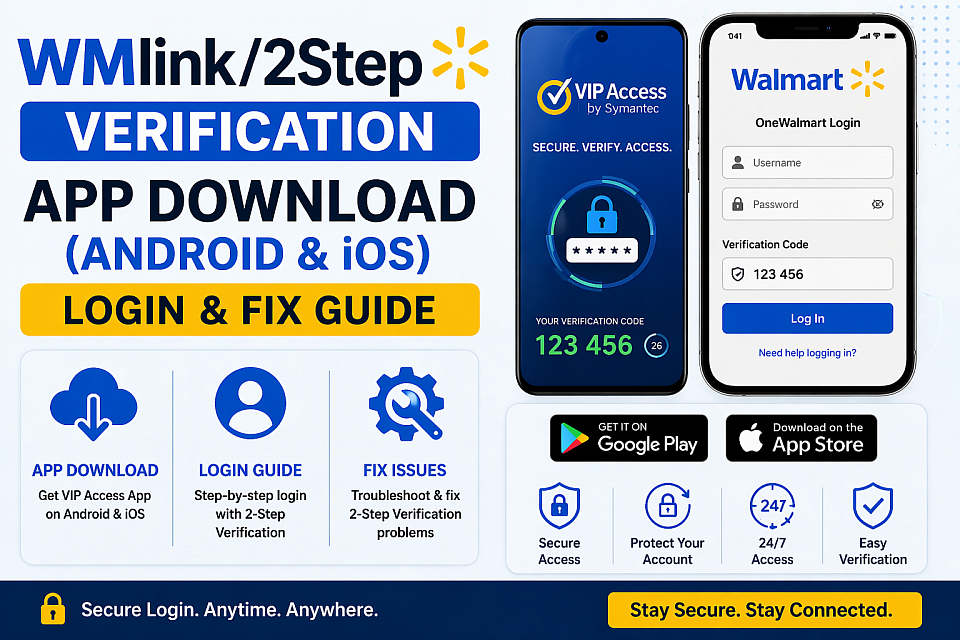
WMlink/2 Step Verification App Download (Android & iOS)
Employees often search for a “Walmart 2-step verification app” when logging in from home, but there is no official app. The system works through WMlink 2-Step Verification (2SV) by Walmart, ensuring secure access to employee accounts and data.
To access OneWalmart or Me@Walmart outside the network, associates must use Symantec VIP Access, which generates 6-digit verification codes for login.
Download & Setup
Install VIP Access from the Play Store or App Store, open it to get your Credential ID, and link it through the WMlink/2Step portal inside the store network.
Login & Fix Issues
Sign in using username, password, and the 6-digit code. If issues occur, restart your device, check network/SMS, and avoid unofficial apps.
👉 Download & fix issues: https://wmlink2step.co/download-app/
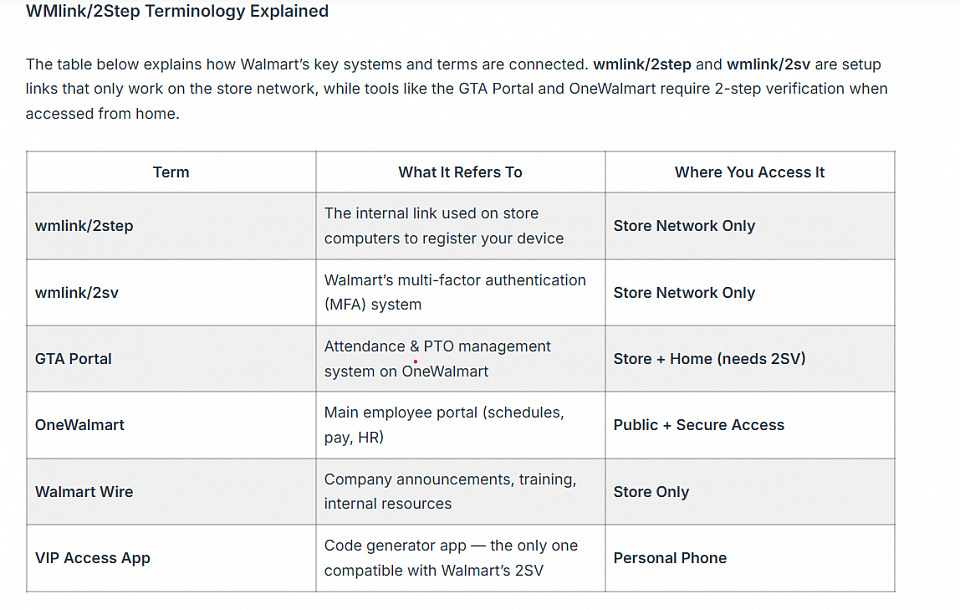
Wmlin2step terminology
What Is the GTA Portal at Walmart?
The GTA Portal (Global Time and Attendance Portal) is Walmart’s dedicated time management system accessible through OneWalmart, where associates submit PTO and PPTO requests, track attendance points, and review timesheet records and requires wmlink/2 step to be active when accessed from a personal device at home. Here’s what Walmart associates use the GTA Portal for:
Time-Off Requests — Submit PTO (Paid Time Off) and PPTO (Protected Paid Time Off) requests directly through the portal rather than tracking down a manager.Attendance Point Tracking — The GTA Portal shows your current Attendance Points (occurrences) and flags “Key Event Dates” — high-traffic days where absences count double.Timesheet Review — Before payroll is finalized, associates can review their clock-in/out history inside the GTA timesheet to make sure hours are recorded accurately.Legacy Replacement — The GTA Portal replaced older tools like the Salary PTO Tracker and brought hourly and salaried associates into one unified system.
Critical connection to 2-step: The GTA Portal requires authentication when accessed from a personal device. Without wmlink/2 step configured, you’ll hit a wall the moment you try to open your attendance records or request time off from home.
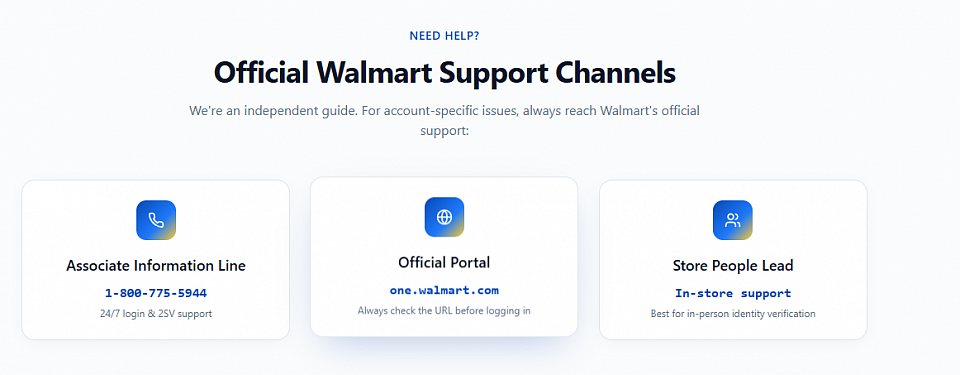
Walmart support Channels
If you’re locked out, facing login errors, or having trouble with WMlink/2-Step Verification (2SV), Walmart provides dedicated support teams to restore secure access to your account, schedules, and payroll systems.
For technical issues like verification errors, device problems, or account lockouts, IT Field Support can reset 2SV and fix login access. For HR-related queries pay, benefits, and schedules, People Services provides assistance.
👉 Get support and fix your account issues: https://wmlink2step.co/contact-support/
Support & Helpline
If you face any issues, contact Walmart support:
US Store & Field Associates: 479-273-4357
Home Office Associates: 479-273-8866
Canada Help Desk: 1-855-578-6369
Email: [email protected]
Walmart Useful Links
🔗 OneWalmart Portal
👉 https://one.walmart.com
Access schedules, paystubs, benefits, and employee tools from Walmart.
📲 Careers at Walmart
👉 https://careers.walmart.com
Explore jobs, apply for roles, and view career opportunities.
🏢 Walmart Corporate
👉 https://corporate.walmart.com/about/working-at-walmart
Learn about work culture, growth, and employee benefits.
WMLink/2Step — U.S. Geographic Reach
Walmart associates nationwide use WMLink/2-Step Verification to securely access OneWalmart remotely, including employees in:
Arkansas — Walmart HQ in Bentonville; Home Office associates
Texas — Houston, Dallas, San Antonio, and Austin store networks
California — Los Angeles, San Diego, and Sacramento associates
Florida — Miami, Orlando, and Tampa locations
New York — NYC, Buffalo, and Albany store employees
Illinois — Chicago-area stores and distribution centers
✅ Enrollment process is the same in every state — always set up on a store workstation inside the Walmart network.
📞 Canada associates: Call 1-855-578-6369 for 2SV support.
I am Zylen Archer Workforce Systems Specialist focused on helping associates navigate secure login systems, employee portals, and 2-step verification. As a contributor at wmlink2step.co, he simplifies tools like OneWalmart login, authentication apps, payroll, and scheduling systems.
🎓 Background & Expertise
Bachelor’s in Information Systems & Digital Technology
Master’s in Technology Management & Workforce Systems
Certified in IAM, MFA Systems, and Workforce Technology
💡 What He Does
Simplifies login, 2-step verification, and account access
Guides users on payroll, schedules, and employee tools
Fixes login errors, verification issues, and device problems
📊 Quick Facts
Profession: Workforce Systems Specialist
Expertise: WMlink/2Step, OneWalmart Login, MFA Authentication
Location: United States
💬 Belief
Making complex login systems simple, secure, and easy for every employee to use.
Terms and Conditions
The Terms and Conditions explain how you can use wmlink2step.co and the rules users must follow. By using the site, you agree to comply with these terms and applicable laws.
They cover key points such as eligibility (18+), proper use of the service, content ownership, third-party links, service termination, disclaimers, limitation of liability, and dispute handling under U.S. law. Any updates become effective immediately after posting.
🔗 Terms and Conditions: https://wmlink2step.co/terms-conditions/
Privacy Policy
The Privacy Policy explains how wmlink2step.co collects, uses, and protects user information. By using the site, you agree to its data practices.
It covers key points like data collection, use of cookies, sharing with third-party services, security measures, and user rights. Updates to the policy take effect immediately after posting.
Follow Follow us on wmlink2step.co Social links:
Facebook: https://www.facebook.com/wmlink2step.co
Quora: https://www.quora.com/profile/WMLink2Step-Co
Github: https://github.com/wmlink2stepco
Twictch: https://www.twitch.tv/wmlink2stepco/about
Behance: https://www.behance.net/wmlink2stepco
Pinterest: https://www.pinterest.com/wmlink2stepco/
Other Blog related Links:
https://wmlink2stepco.website3.me/
https://wmlink2stepco-3.jimdosite.com/
https://wmlink2step-co.mystrikingly.com/
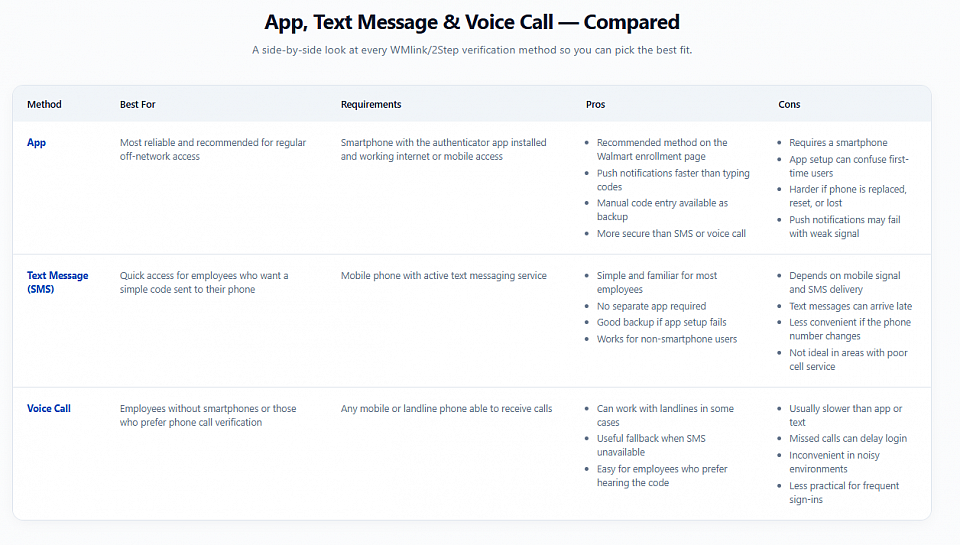
APp,Textmessage and voice call comparison
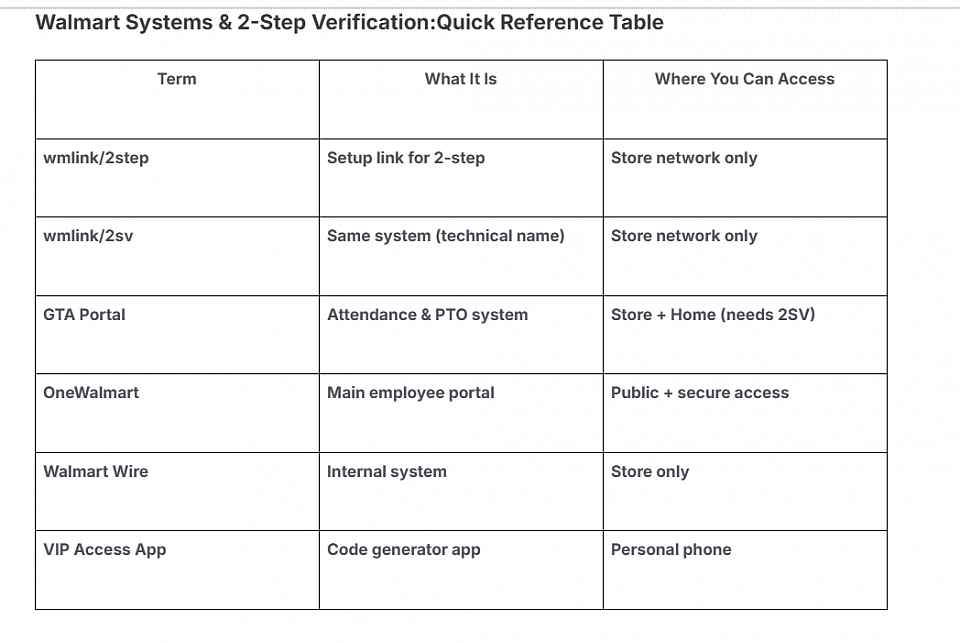
walmart systems and 2 step verification quick reference Table
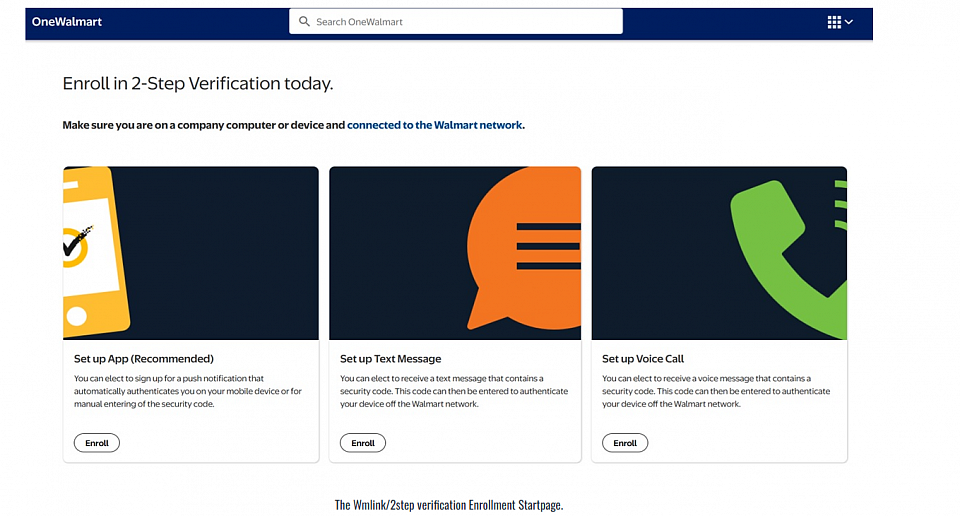
Enroll in 2-step verification